Year

2024

Keywords

Client-facing, design sprint, user interviews

DataDirect

DataDirect

SaaS Dashboard Design Sprint

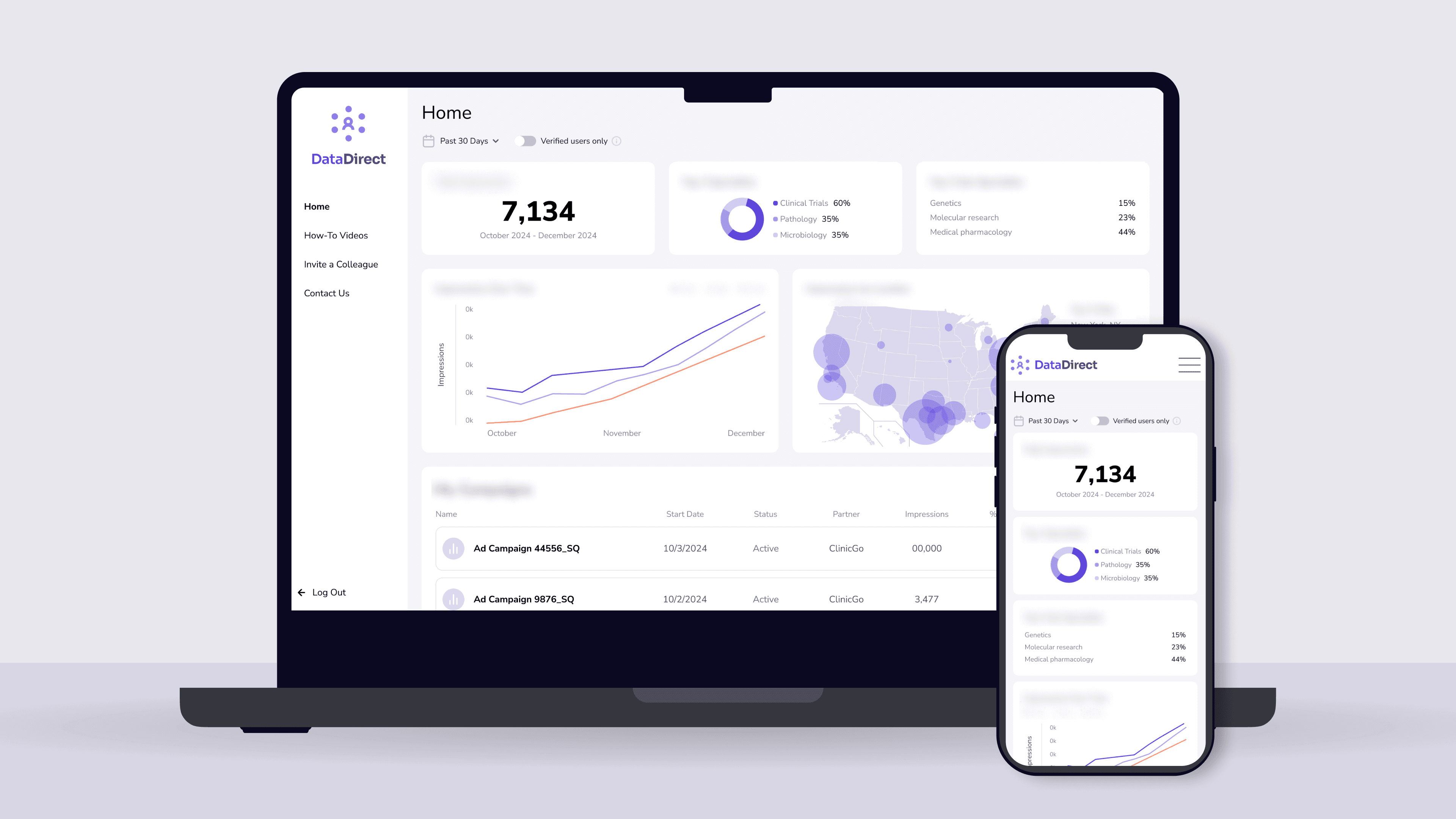
Design, testing, and onboarding for a client-facing SaaS dashboard.
Problem

Innovative ideas abound, but tried-and-true products return on investment – is there a middle-ground?

Innovative ideas abound, but tried-and-true products return on investment – is there a middle-ground?

Innovative ideas abound, but tried-and-true products return on investment – is there a middle-ground?

In 2024, a publication for medical lab professionals sought to enhance the experience of their advertising clients. While a campaign dashboard was proposed, a full build could have required resources currently utilized for established initatives. The company wanted to validate the product before committing to development.

HMW Question

How might we validate our business hypothesis before investing in development?

Solution

Utilize Design Sprint methodology to congregate on decisions, craft an interactive prototype, conduct user interviews, and put our hypothesis to the test.

Utilize Design Sprint methodology to congregate on decisions, craft an interactive prototype, conduct user interviews, and put our hypothesis to the test.

Utilize Design Sprint methodology to congregate on decisions, craft an interactive prototype, conduct user interviews, and put our hypothesis to the test.

To address this, the company decided to use Design Sprint methodology to quickly test whether their business hypothesis was correct. I was sourced by the main sprint facilitator to assist the team from stakeholder interviews through ideation, prototyping, and testing within two weeks. As the interface designer, I facilitated the ideation, created high-fidelity prototypes based on sprint decision, and interviewed users on the prototype. I also created how-to guides to onboard first-time users.

Responsibilities

Design Sprint facilitation

High-fidelity prototypes

Logo and palette

User testing with prototype

How-to video creation with Scribe

User acceptance testing

Design Sprint facilitation

High-fidelity prototypes

Logo and palette

User testing with prototype

How-to video creation with Scribe

User acceptance testing

Design Sprint facilitation

High-fidelity prototypes

Logo and palette

User testing with prototype

How-to video creation with Scribe

User acceptance testing

What is a Design Sprint?

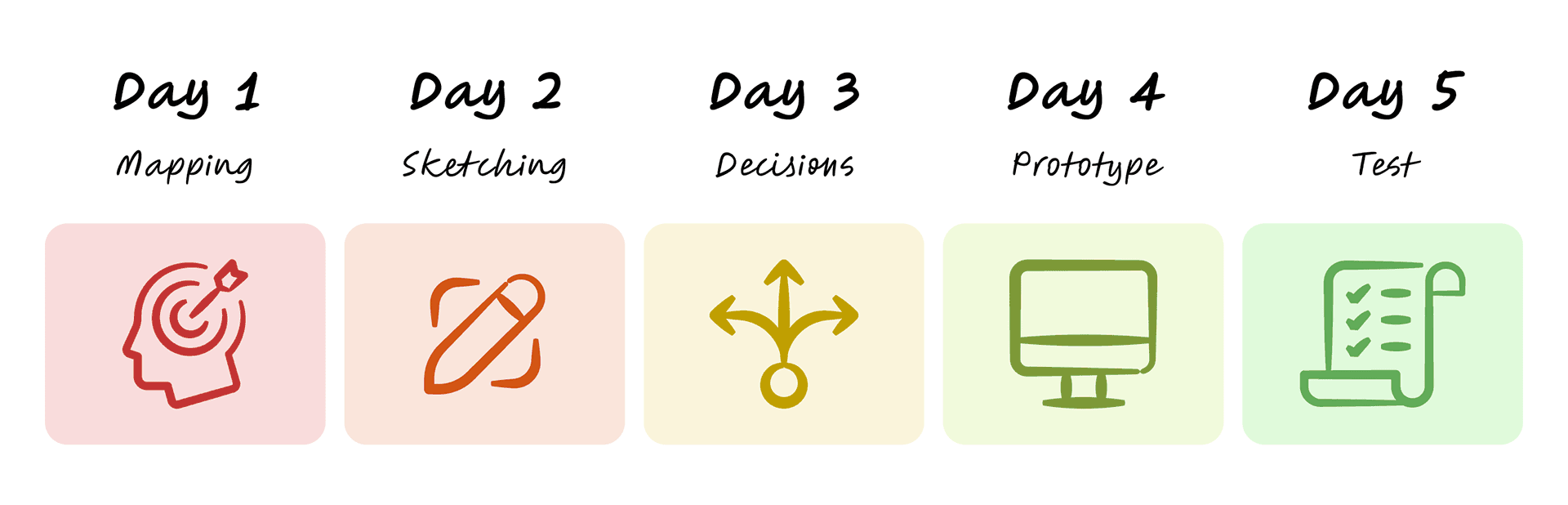
A Design Sprint is a five-day process developed by Jake Knapp and John Zeratsky at Google Ventures. It helps teams rapidly move from problem to tested solution through five key phases:


Prep Work: Interviews & Affinity Diagram

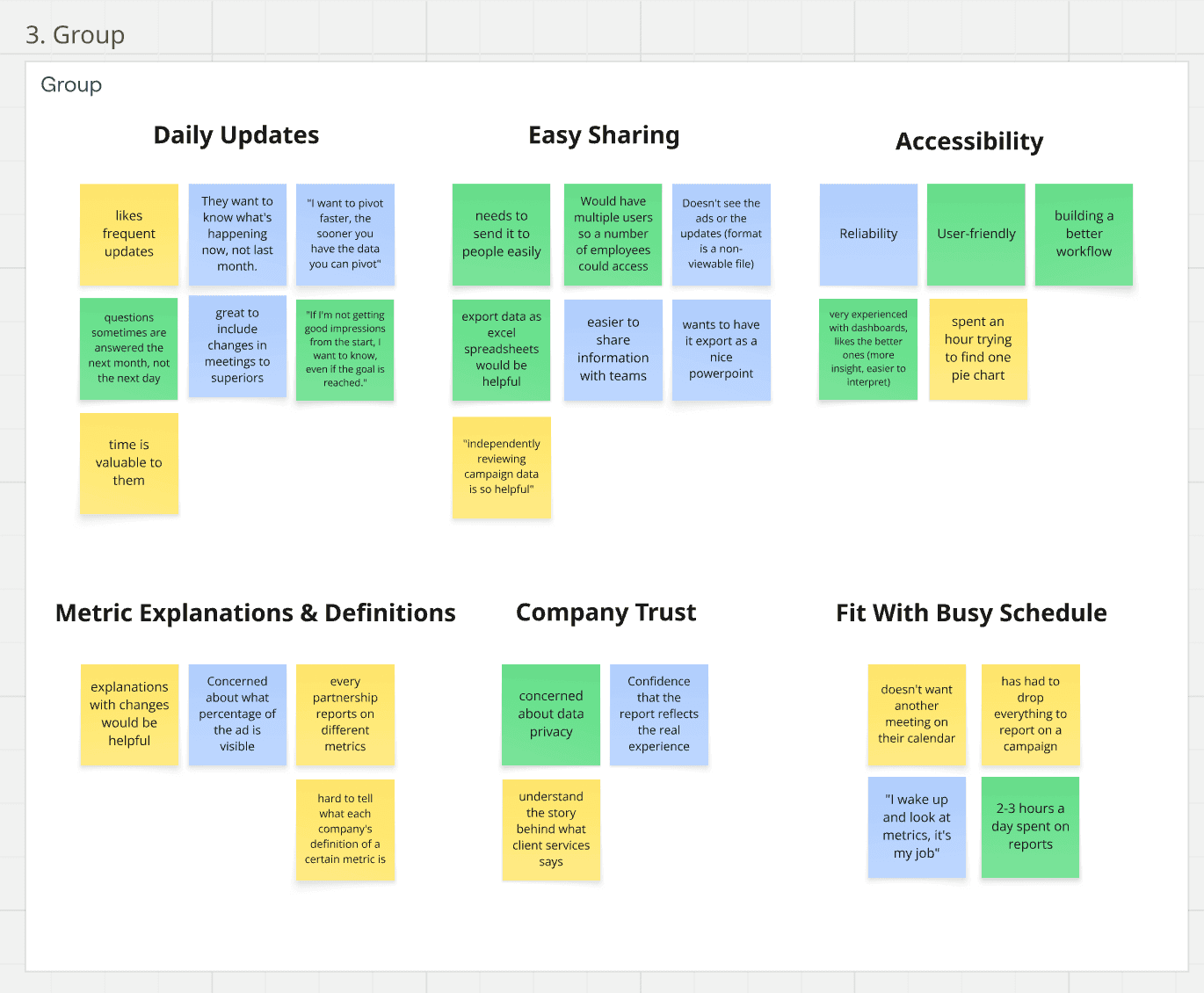
Before the sprint began, our team conducted client interviews to understand their needs. Insights from these interviews were organized using an Affinity Diagram - a method for grouping related ideas and observations to reveal patterns and prioritize features.

NOTICE: All diagrams, charts, and tables are for demonstration purposes only.


Day 1: Mapping User Journeys

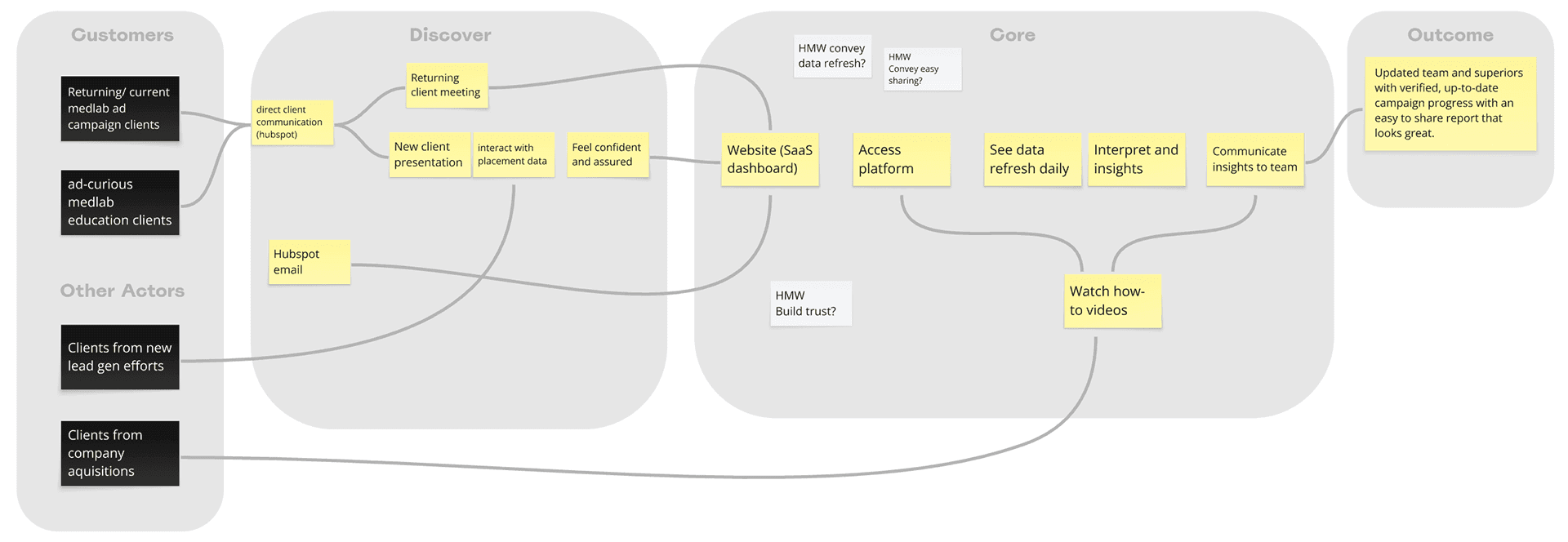
On the first day of the sprint, our team defined the problem space and mapped out the key user journey. We used the collaboration platform Miro to document and identify goals, challenges, and critical touchpoints to guide the sprint.


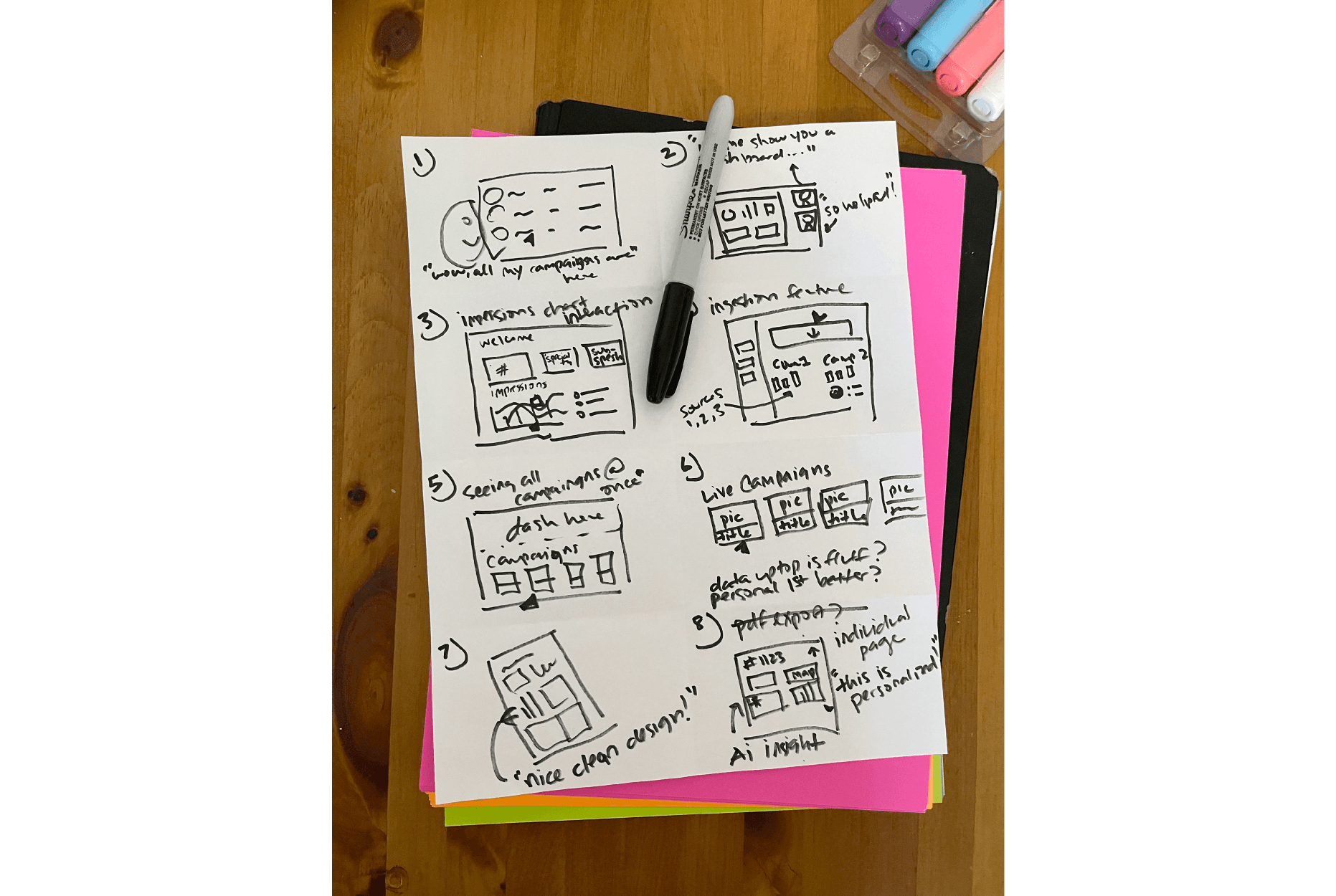
Day 2: Sketching Solutions

Using the mapping decisions from yesterday, team members sketched potential solutions individually. This encouraged diverse ideas and allowed the best concepts to emerge without group bias.


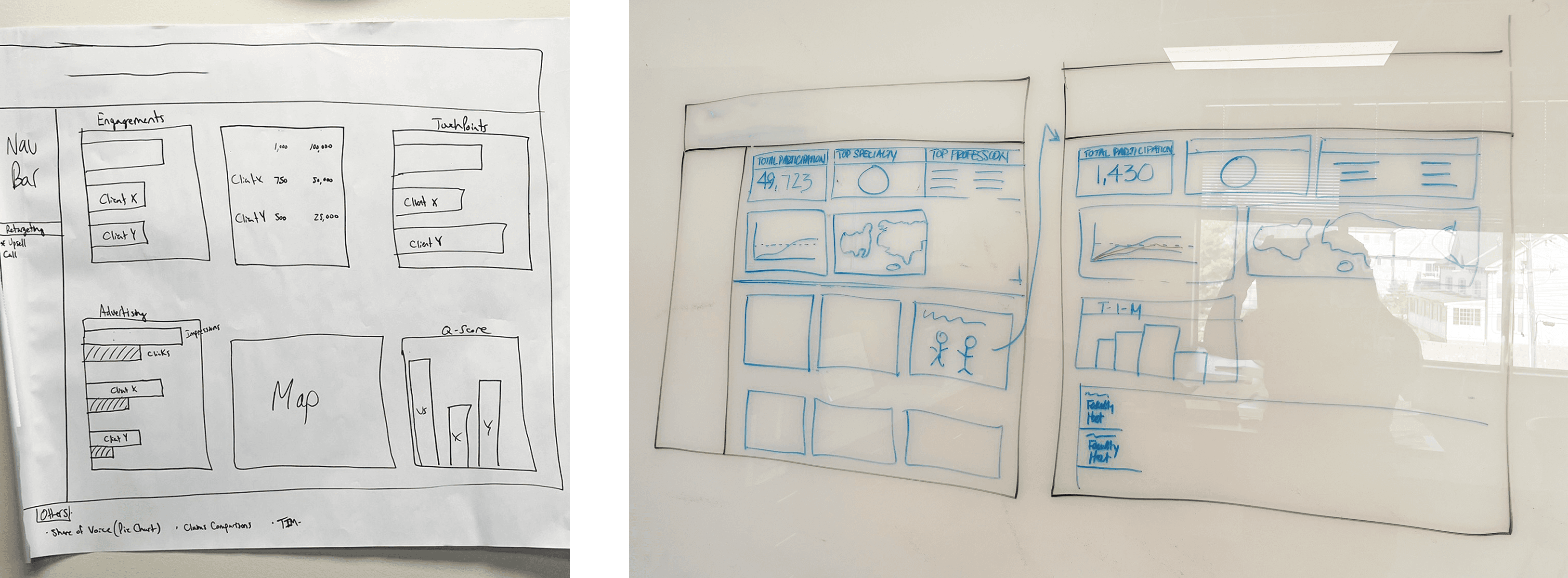
Day 3: Final Feature Decisions

The team reviewed all solution sketches and selected the most promising ideas. Final decisions were visualized by creating low-fidelity sketches with labels and some placement data, allowing the team to see how concepts would work in practice before moving into prototyping.


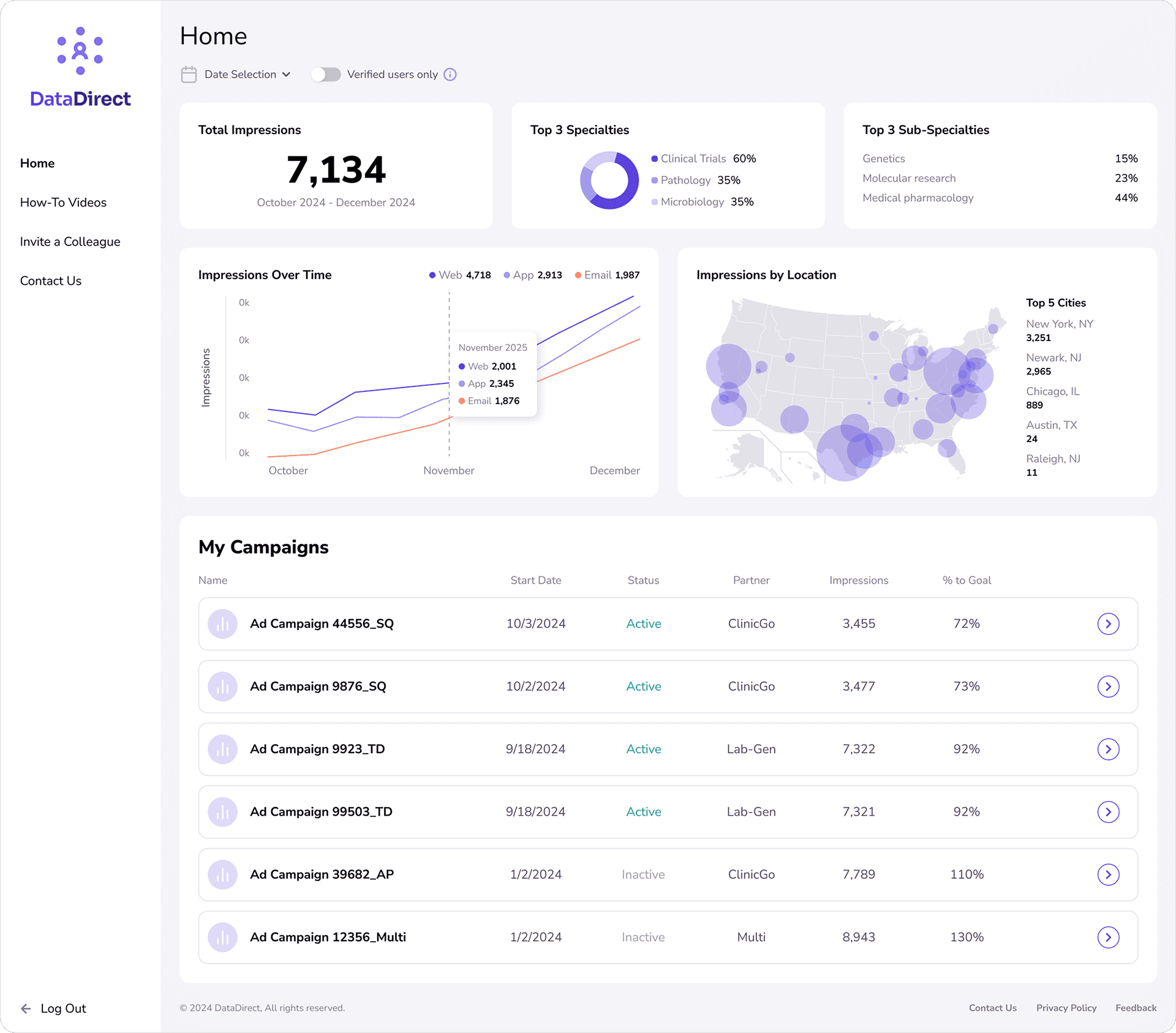
Day 4: Clickable Prototype Design

For this step, I built a high-fidelity prototype of the dashboard in Figma, designing all key pages and interactions in detail. By the end of the day, the prototype was fully functional, with key flows that mirrored how the solution would work in practice.

First, DataDirect users sign in to see a dashboard as their homepage, pre-populated with their campaigns.


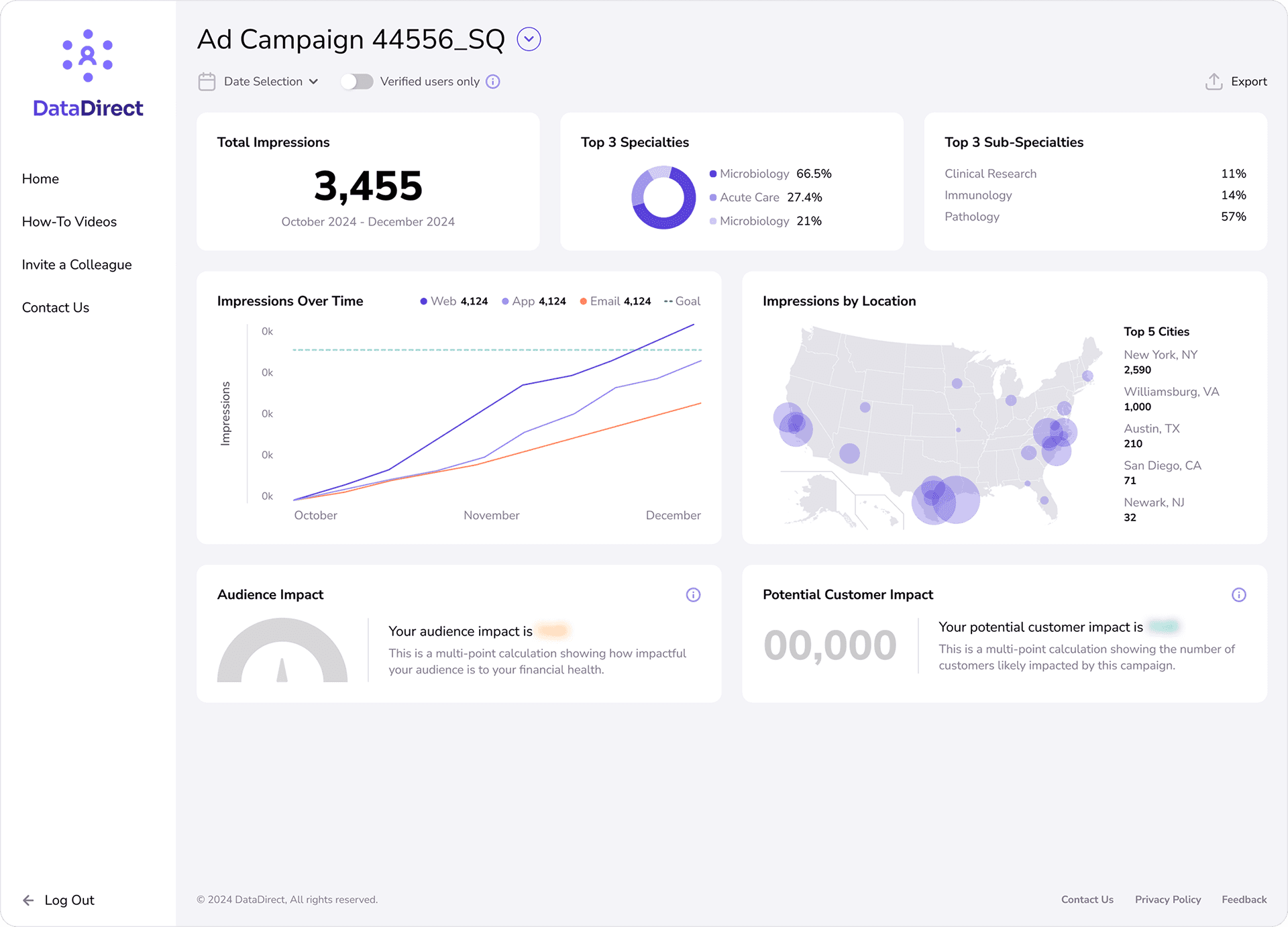
Clicking a single list item under the "My Campaigns" section navigates users to a similar dashboard, displaying metrics for the campaign of their choice.


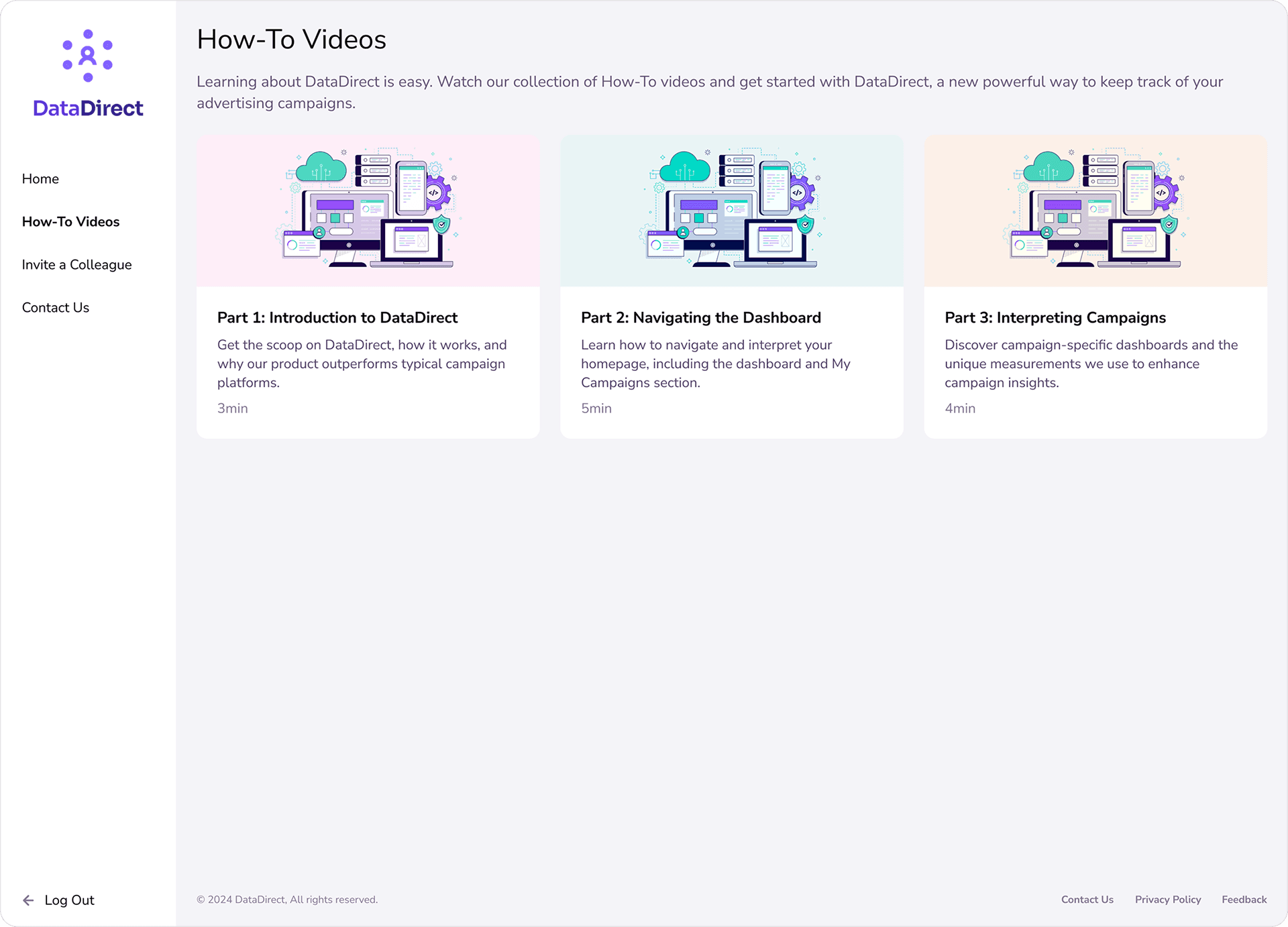
A series of how-to videos (created using Scribe) are accessible from the main menu (left) 


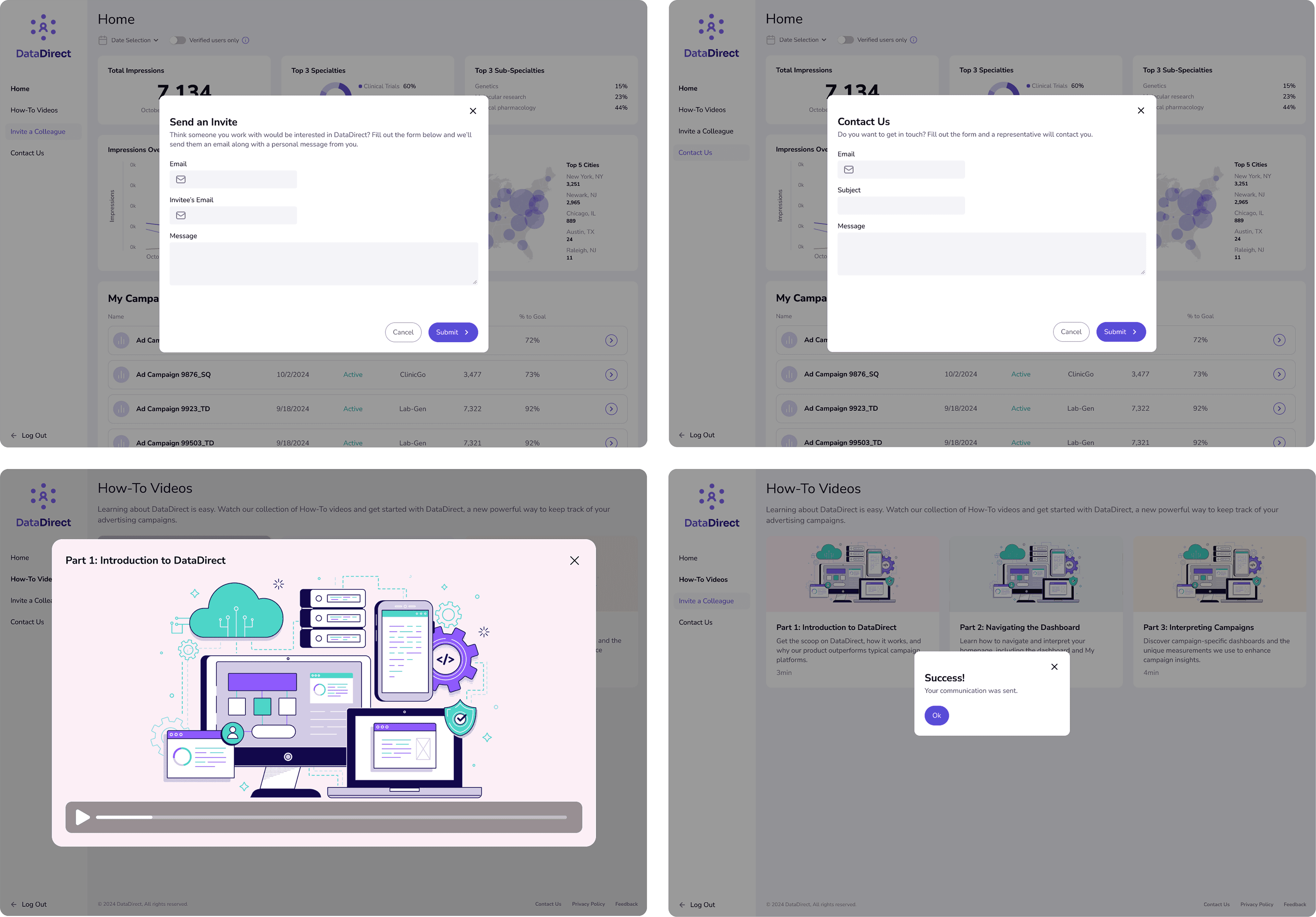
I also designed a number of pop-up modules to support contact capabilities, multimedia, and form validation feedback.


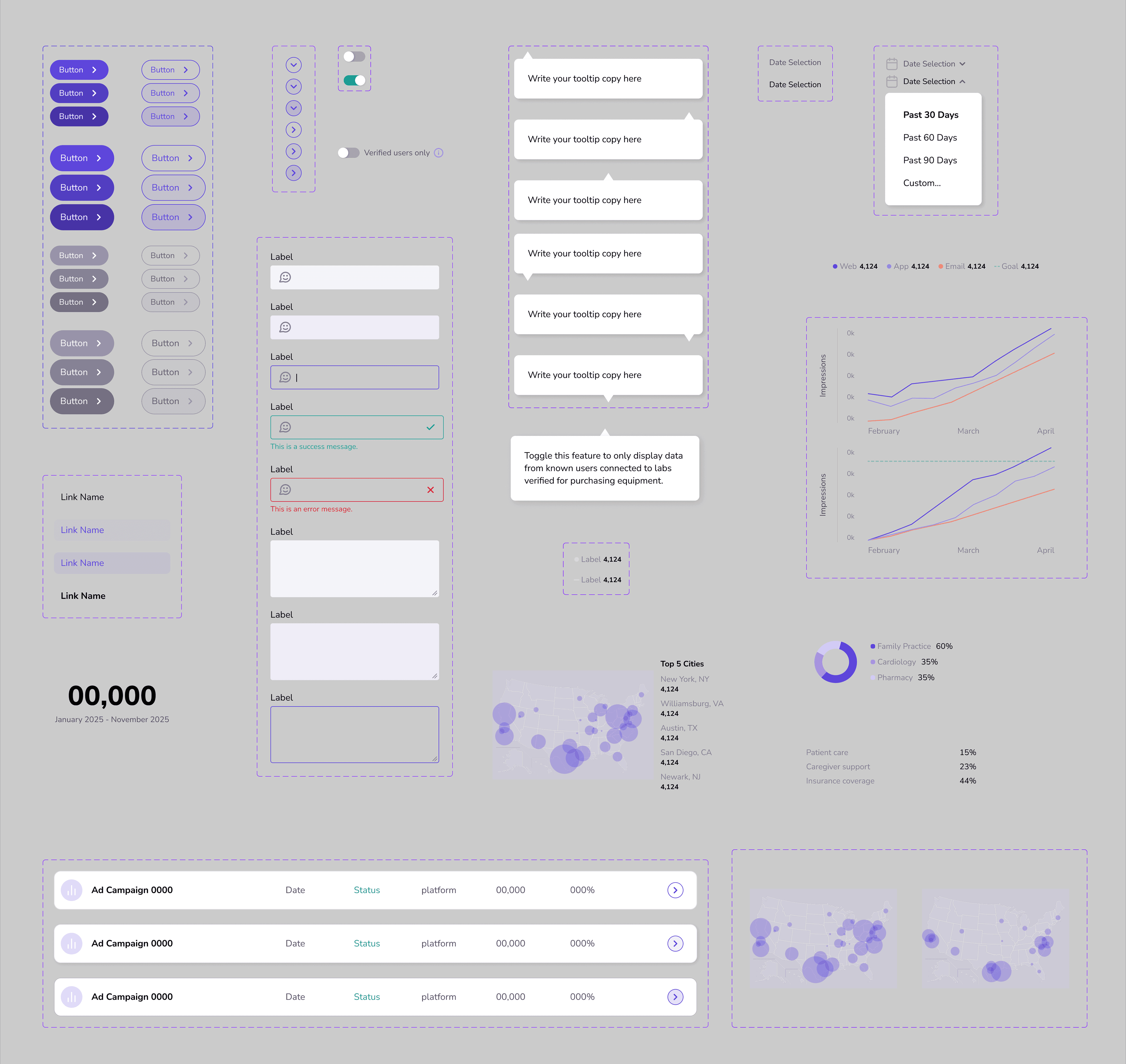
The key to this prototype was the design system I made in Figma, which helped me utilize components instead of single-use assets. This kept the style consistent, allowed for quick formatting changes across all instances, and embedded pages with rules for responsive resizing.


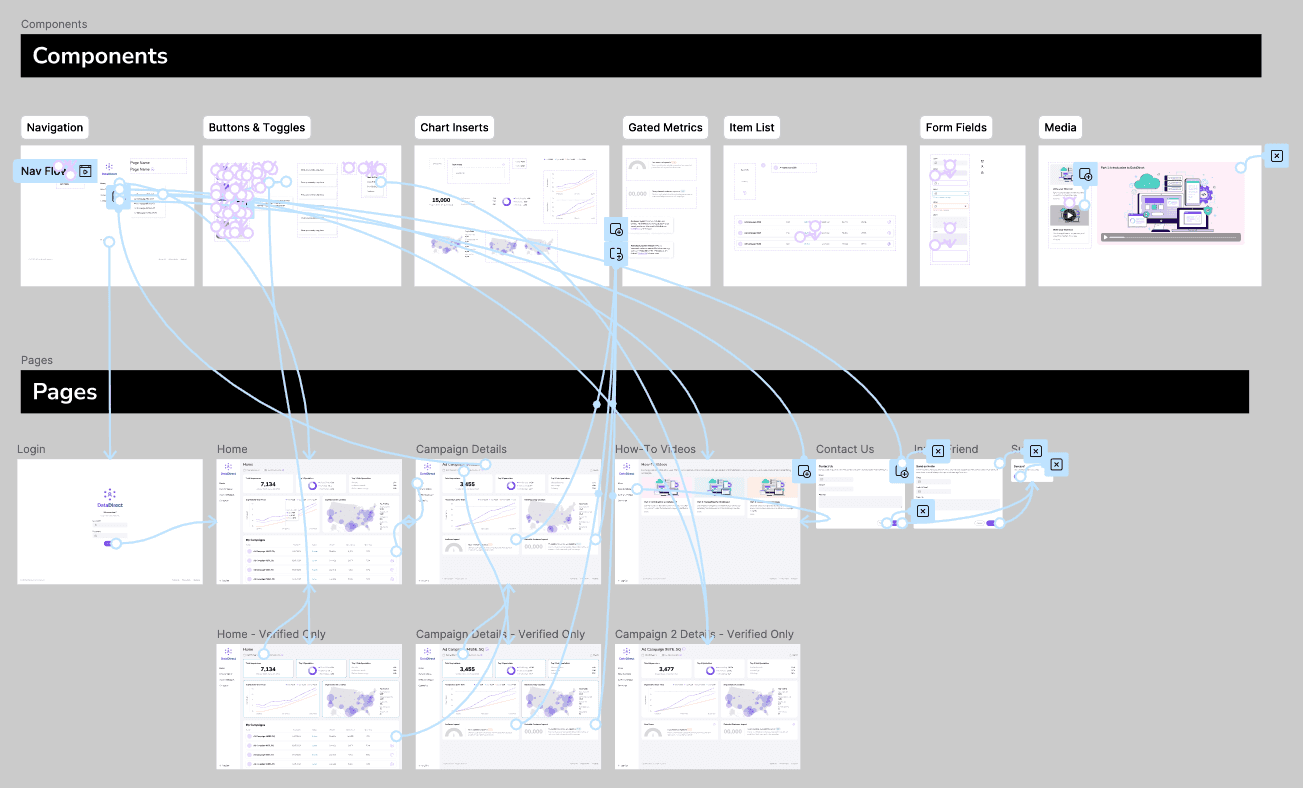
Lastly, using Figma's prototype mode, I created interactions by connecting elements (blue arrows) and creating state changes for interactive components (purple). Each connection is a command to overlay, navigate to, or introduce another element.


Day 5: Testing With Users

The result of yesterday's work was a convincing, interactive prototype with multiple states, pages, flows, and modes. I used animation settings like dissolve and smart animate to give it the feel of a developed platform.

The prototype, now tentatively branded as DataDirect, was ready to be tested. Observations from these sessions would validate assumptions, revealed pain points, and informed next steps for development.


VIDEO: The interactions and states in the prototype are captured on this demonstration of a typical user exploration process, which shows how dynamic the prototype had to be in order to fulfill the business flows under testing.


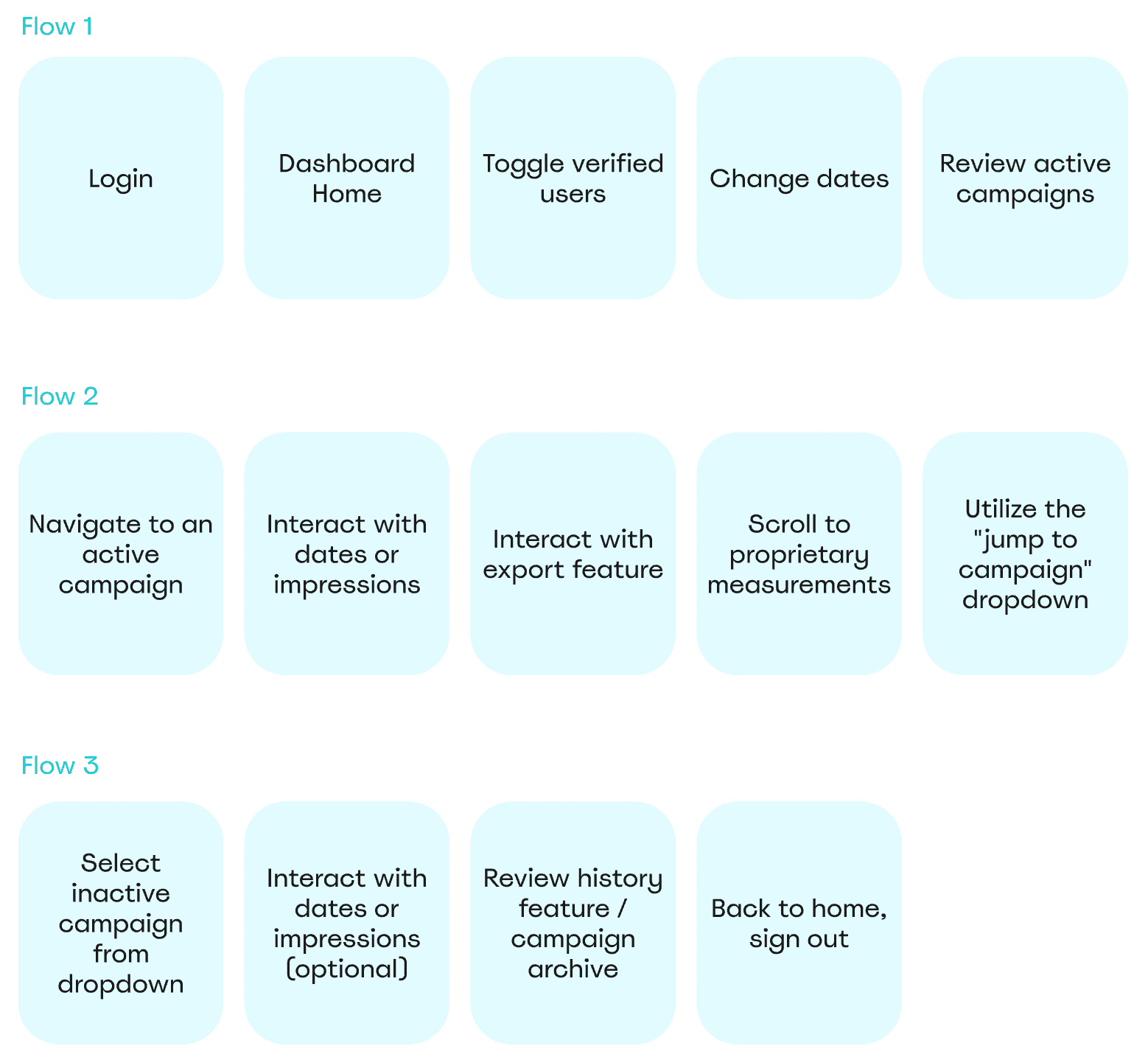
Each user was taken through 3 flows, which were identified on Day 3 of the sprint as the most crucial for measuring user sentiment.


Scoring to Determine Success

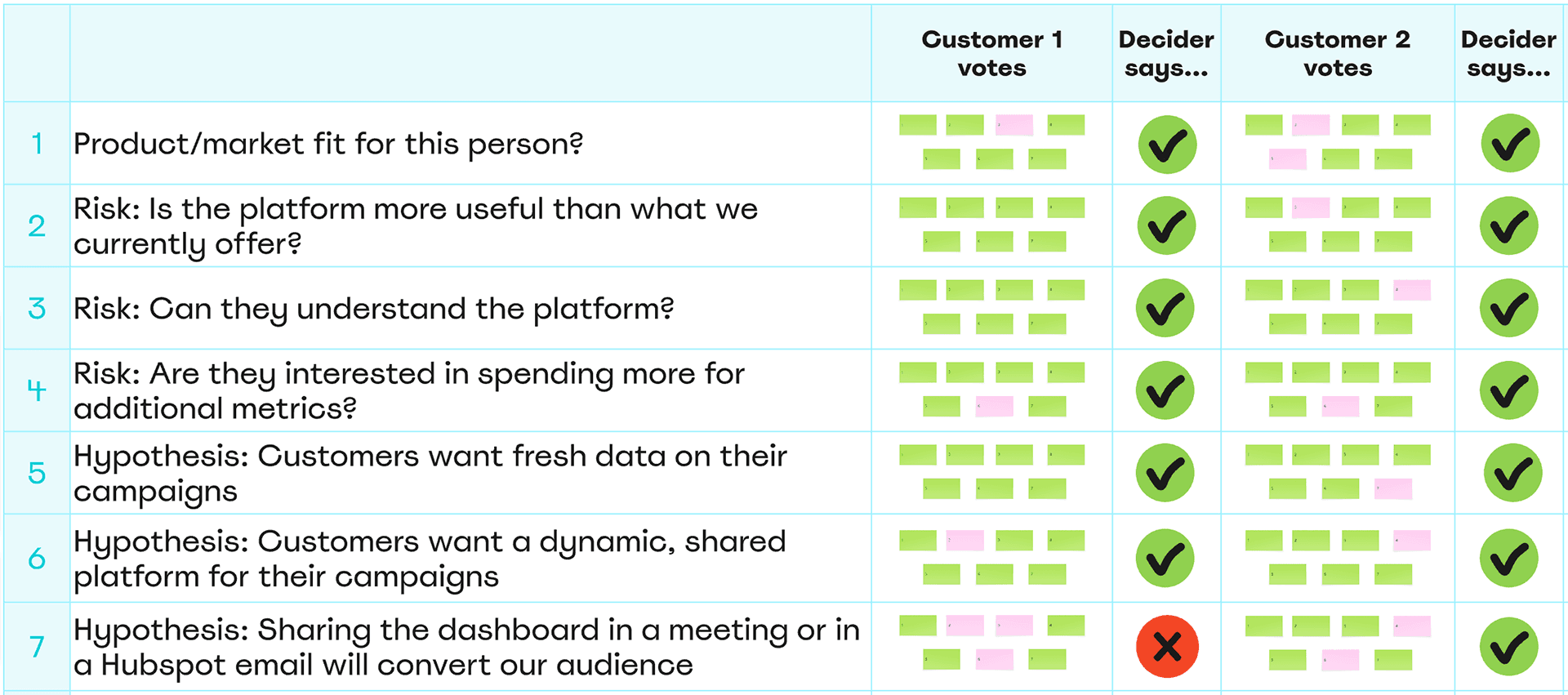
To score the user sentiment of DataDirect, the design sprint included a scorecard that was filled out for each user. As they navigated through the prototype, the team and I gauged their response to important benchmarks, determined on Day 1 of the sprint. Each green or pink square represents a team member's opinion.

What is a Design Sprint?

A Design Sprint is a five-day process developed by Jake Knapp and John Zeratsky at Google Ventures. It helps teams rapidly move from problem to tested solution through five key phases:


Prep Work: Interviews & Affinity Diagram

Before the sprint began, our team conducted client interviews to understand their needs. Insights from these interviews were organized using an Affinity Diagram - a method for grouping related ideas and observations to reveal patterns and prioritize features.

NOTICE: All diagrams, charts, and tables are for demonstration purposes only.


Day 1: Mapping User Journeys

On the first day of the sprint, our team defined the problem space and mapped out the key user journey. We used the collaboration platform Miro to document and identify goals, challenges, and critical touchpoints to guide the sprint.


Day 2: Sketching Solutions

Using the mapping decisions from yesterday, team members sketched potential solutions individually. This encouraged diverse ideas and allowed the best concepts to emerge without group bias.


Day 3: Final Feature Decisions

The team reviewed all solution sketches and selected the most promising ideas. Final decisions were visualized by creating low-fidelity sketches with labels and some placement data, allowing the team to see how concepts would work in practice before moving into prototyping.


Day 4: Clickable Prototype Design

For this step, I built a high-fidelity prototype of the dashboard in Figma, designing all key pages and interactions in detail. By the end of the day, the prototype was fully functional, with key flows that mirrored how the solution would work in practice.

First, DataDirect users sign in to see a dashboard as their homepage, pre-populated with their campaigns.


Clicking a single list item under the "My Campaigns" section navigates users to a similar dashboard, displaying metrics for the campaign of their choice.


A series of how-to videos (created using Scribe) are accessible from the main menu (left) 


I also designed a number of pop-up modules to support contact capabilities, multimedia, and form validation feedback.


The key to this prototype was the design system I made in Figma, which helped me utilize components instead of single-use assets. This kept the style consistent, allowed for quick formatting changes across all instances, and embedded pages with rules for responsive resizing.


Lastly, using Figma's prototype mode, I created interactions by connecting elements (blue arrows) and creating state changes for interactive components (purple). Each connection is a command to overlay, navigate to, or introduce another element.


Day 5: Testing With Users

The result of yesterday's work was a convincing, interactive prototype with multiple states, pages, flows, and modes. I used animation settings like dissolve and smart animate to give it the feel of a developed platform.

The prototype, now tentatively branded as DataDirect, was ready to be tested. Observations from these sessions would validate assumptions, revealed pain points, and informed next steps for development.


VIDEO: The interactions and states in the prototype are captured on this demonstration of a typical user exploration process, which shows how dynamic the prototype had to be in order to fulfill the business flows under testing.


Each user was taken through 3 flows, which were identified on Day 3 of the sprint as the most crucial for measuring user sentiment.


Scoring to Determine Success

To score the user sentiment of DataDirect, the design sprint included a scorecard that was filled out for each user. As they navigated through the prototype, the team and I gauged their response to important benchmarks, determined on Day 1 of the sprint. Each green or pink square represents a team member's opinion.


What is a Design Sprint?

A Design Sprint is a five-day process developed by Jake Knapp and John Zeratsky at Google Ventures. It helps teams rapidly move from problem to tested solution through five key phases:


Prep Work: Interviews & Affinity Diagram

Before the sprint began, our team conducted client interviews to understand their needs. Insights from these interviews were organized using an Affinity Diagram - a method for grouping related ideas and observations to reveal patterns and prioritize features.

NOTICE: All diagrams, charts, and tables are for demonstration purposes only.


Day 1: Mapping User Journeys

On the first day of the sprint, our team defined the problem space and mapped out the key user journey. We used the collaboration platform Miro to document and identify goals, challenges, and critical touchpoints to guide the sprint.


Day 2: Sketching Solutions

Using the mapping decisions from yesterday, team members sketched potential solutions individually. This encouraged diverse ideas and allowed the best concepts to emerge without group bias.


Day 3: Final Feature Decisions

The team reviewed all solution sketches and selected the most promising ideas. Final decisions were visualized by creating low-fidelity sketches with labels and some placement data, allowing the team to see how concepts would work in practice before moving into prototyping.


Day 4: Clickable Prototype Design

For this step, I built a high-fidelity prototype of the dashboard in Figma, designing all key pages and interactions in detail. By the end of the day, the prototype was fully functional, with key flows that mirrored how the solution would work in practice.

First, DataDirect users sign in to see a dashboard as their homepage, pre-populated with their campaigns.


Clicking a single list item under the "My Campaigns" section navigates users to a similar dashboard, displaying metrics for the campaign of their choice.


A series of how-to videos (created using Scribe) are accessible from the main menu (left) 


I also designed a number of pop-up modules to support contact capabilities, multimedia, and form validation feedback.


The key to this prototype was the design system I made in Figma, which helped me utilize components instead of single-use assets. This kept the style consistent, allowed for quick formatting changes across all instances, and embedded pages with rules for responsive resizing.


Lastly, using Figma's prototype mode, I created interactions by connecting elements (blue arrows) and creating state changes for interactive components (purple). Each connection is a command to overlay, navigate to, or introduce another element.


Day 5: Testing With Users

The result of yesterday's work was a convincing, interactive prototype with multiple states, pages, flows, and modes. I used animation settings like dissolve and smart animate to give it the feel of a developed platform.

The prototype, now tentatively branded as DataDirect, was ready to be tested. Observations from these sessions would validate assumptions, revealed pain points, and informed next steps for development.


VIDEO: The interactions and states in the prototype are captured on this demonstration of a typical user exploration process, which shows how dynamic the prototype had to be in order to fulfill the business flows under testing.


Each user was taken through 3 flows, which were identified on Day 3 of the sprint as the most crucial for measuring user sentiment.


Scoring to Determine Success

To score the user sentiment of DataDirect, the design sprint included a scorecard that was filled out for each user. As they navigated through the prototype, the team and I gauged their response to important benchmarks, determined on Day 1 of the sprint. Each green or pink square represents a team member's opinion.


Results

It's a win! The proposal was designed, prototyped, and validated by user interviews in a highly condensed timeline – platform development started soon after.

It's a win! The proposal was designed, prototyped, and validated by user interviews in a highly condensed timeline – platform development started soon after.

It's a win! The proposal was designed, prototyped, and validated by user interviews in a highly condensed timeline – platform development started soon after.

🏆

The business hypothesis passed user testing with flying colors!

🏆

The business hypothesis passed user testing with flying colors!

🏆

The business hypothesis passed user testing with flying colors!

👍

Sprint format saved time, narrowed focus to key flows

👍

Sprint format saved time, narrowed focus to key flows

👍

Sprint format saved time, narrowed focus to key flows

⭐️

Clickable prototype played a starring role in user tesing

⭐️

Clickable prototype played a starring role in user tesing

⭐️

Clickable prototype played a starring role in user tesing

Testing confirmed that the prototype directly addressed client pain points, and users were able to successfully navigate and complete key flows without assistance. This validation turned a one-week sprint into a long-term win!

Due to DataDirect's high scores in client interviews, the prototype was developed out into a full-fledged platform and is now available internally for testing and integration.

Testing confirmed that the prototype directly addressed client pain points, and users were able to successfully navigate and complete key flows without assistance. This validation turned a one-week sprint into a long-term win!

Due to DataDirect's high scores in client interviews, the prototype was developed out into a full-fledged platform and is now available internally for testing and integration.

Testing confirmed that the prototype directly addressed client pain points, and users were able to successfully navigate and complete key flows without assistance. This validation turned a one-week sprint into a long-term win!

Due to DataDirect's high scores in client interviews, the prototype was developed out into a full-fledged platform and is now available internally for testing and integration.

Enter password to view case study